App Localization & Multi-Market ASO: A Practical Guide
Quick answer: App localization for ASO means optimizing your store listing for each market's language and search behavior, not just translating it. The costly mistake is translating your English keywords: users in each market search different terms, so you research keywords per market in the local language. Properly localized listings consistently earn higher conversion and more downloads than single-market ones, which is why localization is one of the highest-leverage moves in App Store Optimization.
Last updated: June 2026.
Most teams treat localization as a translation task: hand the listing to a translator, paste the result, done. That captures maybe half the value. Real ASO localization is two jobs: making the listing readable in a market, and making it findable for what people there actually search. This guide covers both, how iOS and Google Play handle locales, and which markets are worth the effort.
Translation vs localization (they're not the same)
- Translation converts your existing copy into another language. Necessary: users won't install what they can't read.
- Localization rewrites the listing and its keywords for how a specific market searches and what it values. A German user looking for a tax app searches
steuererklärung, not the literal translation of "tax return." Translating your English keyword list gives you words nobody types.
If you only translate, you'll rank for the wrong terms (or none) and leave most of the upside on the table.
Why localization is high-leverage
- Reach the majority of users. English is a minority of global app users. Each well-localized market is a new audience that competitors who only ship English can't serve.
- Conversion lifts. Apple's own guidance and multiple vendor benchmarks show meaningfully higher conversion for localized listings; apps covering many markets routinely outperform single-market ones by double-digit percentages.
- Lower competition. Many categories are brutally competitive in English and wide open in, say, Japanese or Brazilian Portuguese. Localized keywords are often far easier to win. See keyword difficulty and search volume.
The two jobs, done right
1. Localize the listing copy. Title, subtitle/short description, description, and screenshots, written natively, not machine-translated. Stilted, obviously-translated copy hurts conversion and trust.
2. Localize the keywords. Do keyword research per market, in the local language. Find the terms real users there search, then place them using each platform's rules (the iOS keyword field is set per localization).
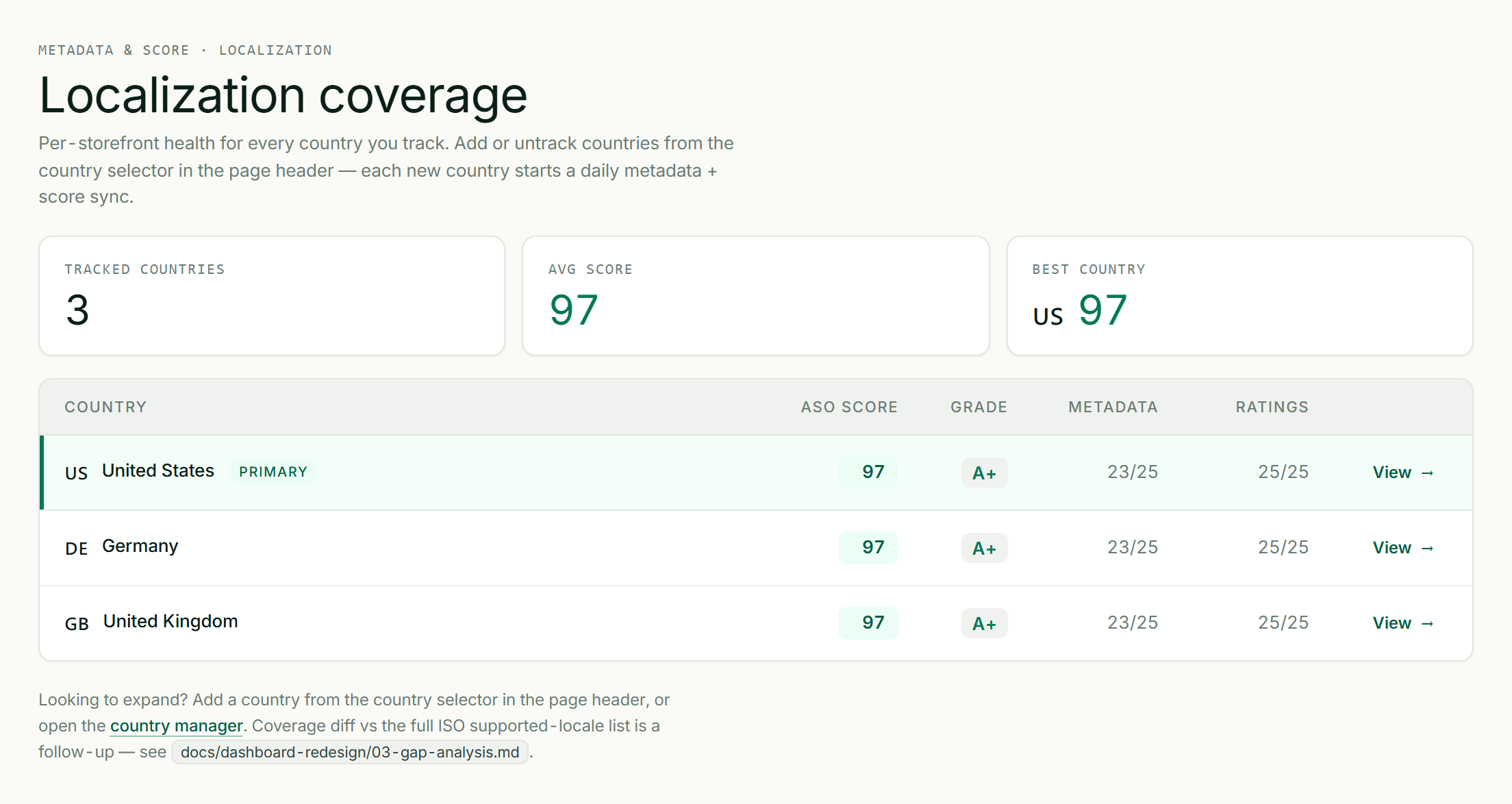
Per-market localization coverage, tracked at the app level.
How iOS and Google Play handle localization
| Apple App Store | Google Play | |
|---|---|---|
| Metadata is set | Per localization (e.g. de-DE, ja) | Per language |
| Keyword field | A separate 100-char keyword field per localization | No keyword field; the localized description is indexed |
| A locale can "borrow" | English (US) metadata indexes in some English storefronts | Default language covers untranslated locales |
| Practical implication | Each locale is a fresh 30/30/100 budget to fill | Each language is a fresh indexed title/short/long description |
The key point: every locale you add is new ranking real estate. On iOS that's another title, subtitle, and 100-character keyword field; on Android another indexed title, short, and long description. That's why localization compounds.
Language tiers: how to set the bar per market
Not every market needs a full-native rewrite to start. A useful way to triage:
- Native markets (most of them): the audience expects fluent, native copy. Translate-and-localize properly or don't bother: bad copy underperforms no localization.
- Bilingual markets (e.g. Nordics, Netherlands): English converts acceptably, but localized still wins. Good second-wave targets.
- English-tolerant: English is widely accepted; localize when you have capacity.
ASOScan bakes this into its AI: metadata generation is language-tier-aware, generating copy that reads native for the target market rather than translated, and multi-country tracking follows every storefront you publish to with per-market keyword research.
A per-market localization workflow
- Pick the market (see prioritization below).
- Research keywords natively for that market; don't translate your English list.
- Write the listing in native copy: title + subtitle/short description carrying the top local keywords, a benefit-led description.
- Fill the local keyword field (iOS) with synonyms and long-tail terms, per the keyword field rules.
- Localize the screenshots: captions in the local language (and on iOS those captions are now indexed; see the 2026 ranking signals).
- Track rankings per market and iterate.
Which markets to prioritize
There's no universal list, but a sensible order:
- Markets where you already get organic installs but haven't localized: fastest payback.
- Large, high-value app markets: US, Japan, South Korea, Germany, France, Brazil, and the broader Spanish-speaking markets.
- Markets where your category is under-served in the local language: easier keywords, less competition.
Let the data lead: if App Store Connect or Play Console shows organic traffic from a market you've never localized, that's your next one.
Common localization mistakes
- Translating keywords instead of researching them. The single biggest error: you rank for terms nobody searches.
- Machine-translated copy. Reads wrong, lowers conversion and trust. Native or properly reviewed only.
- Forgetting the per-locale keyword field (iOS). Each localization has its own 100 characters; an empty one is wasted reach.
- Not localizing screenshots. The biggest conversion lever stays in the wrong language, and on iOS you miss the now-indexed local caption text.
- Localizing once and abandoning it. Rankings and competitors move in every market; revisit.
Frequently asked questions
Does localizing my app increase downloads?
Yes, localized listings consistently convert better and reach audiences an English-only listing can't, and each added locale is new ranking real estate (a fresh keyword field on iOS, a fresh indexed description on Android). The lift is largest in markets where your category is under-served in the local language. The caveat: poorly machine-translated copy can hurt, so localize natively.
Do I need to translate my keywords?
No. You need to research them, which is different. Translating your English keywords gives you terms real users in that market don't type. Do fresh keyword research in the local language for each market, then place those terms in the localized metadata.
How is iOS localization different from Android?
On iOS, metadata (including a separate 100-character keyword field) is set per localization, and the description isn't indexed for keywords. On Google Play, there's no keyword field, but the localized title, short description, and long description are all indexed. Each platform gives every locale fresh ranking real estate; the fields just differ.
Which markets should I localize first?
Start with markets that already send you organic installs without localization (fastest payback), then large high-value app markets (US, Japan, Korea, Germany, France, Brazil, Spanish-speaking), prioritizing categories that are under-served in the local language and therefore easier to rank in.
Can AI localize my app metadata?
AI can draft strong native-sounding metadata when it's prompted with the target market's language and conventions rather than just translating. ASOScan's metadata generation is language-tier-aware for exactly this. Always have a fluent speaker review high-stakes markets. AI gets you 90% there, fast.