

Apple Search Ads, with no ad copy to write.
On Apple Search Ads, your ad is your App Store product page. ASOScan builds the campaign from the keywords you already track, shows a live App Store preview of exactly how it serves, and creates it paused. Nothing spends until you say go.
7-day free trial, no credit card.
Your ad is your product page.
Unlike Google, Apple Search Ads has no headlines, descriptions, or images to write. The ad is your existing App Store listing. So the work is in the right place: the keywords you bid on, the placement, your audience, and your budget. ASOScan builds all of it from what you already track.
- Keyword suggestions from your tracked terms, opportunities, and AI, one click each.
- The app, country, currency and starting keywords are filled in from what you track.
- A pre-launch checklist nudges keyword count, budget vs bid, negatives and CPA goals.
- Created paused: you flip it on (and pause it) whenever you want.
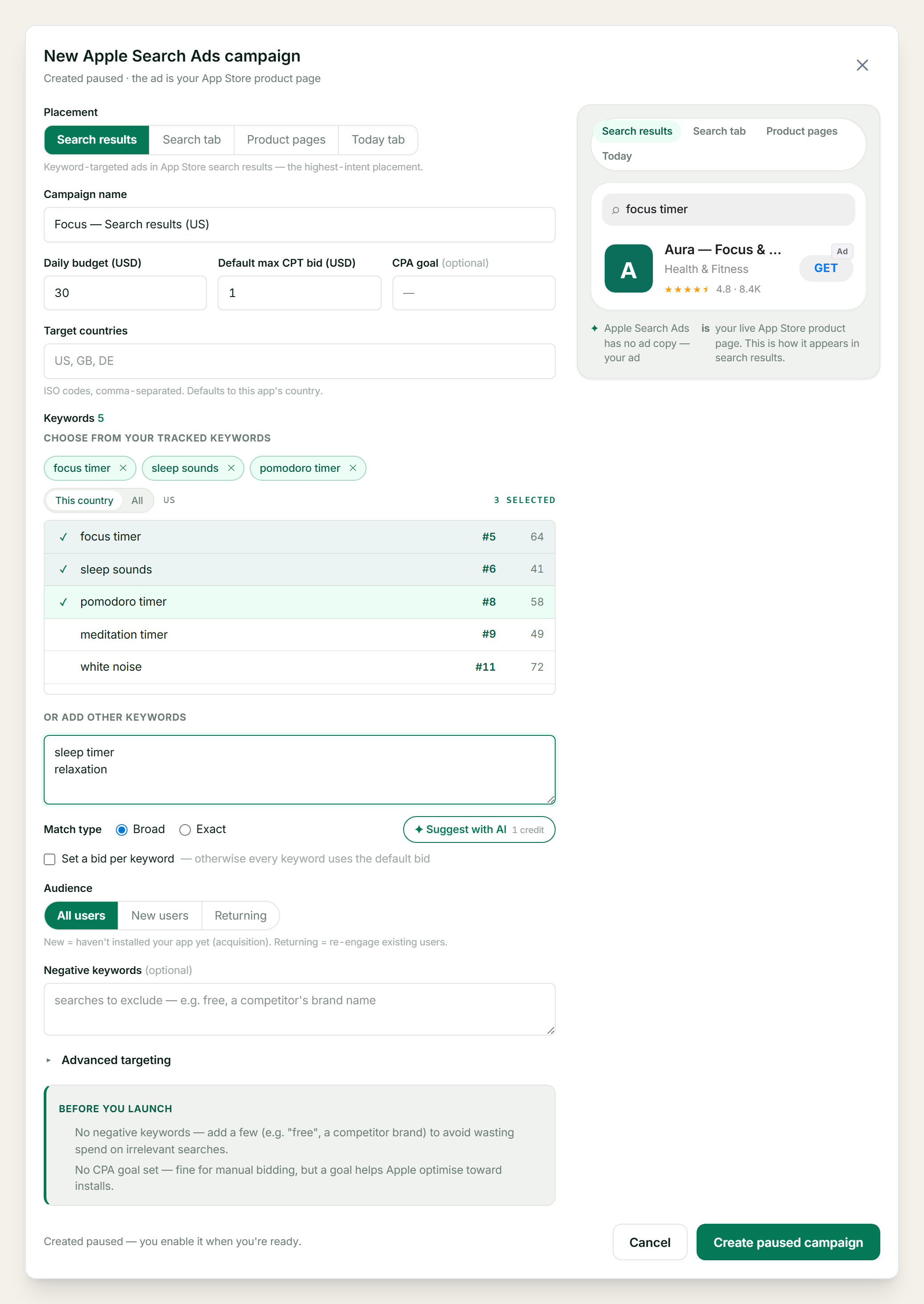
A live App Store preview for every placement.
Because there's nothing to write, there's no guesswork either: ASOScan renders your real icon, name, subtitle and rating exactly the way Apple shows them in Search results, the Search tab, Product pages and the Today tab. Switch placements and watch the ad change.
- All four placements, previewed the way Apple renders them.
- Audience (new / returning), device, age and dayparting targeting.
- Per-keyword bids and negative keywords.
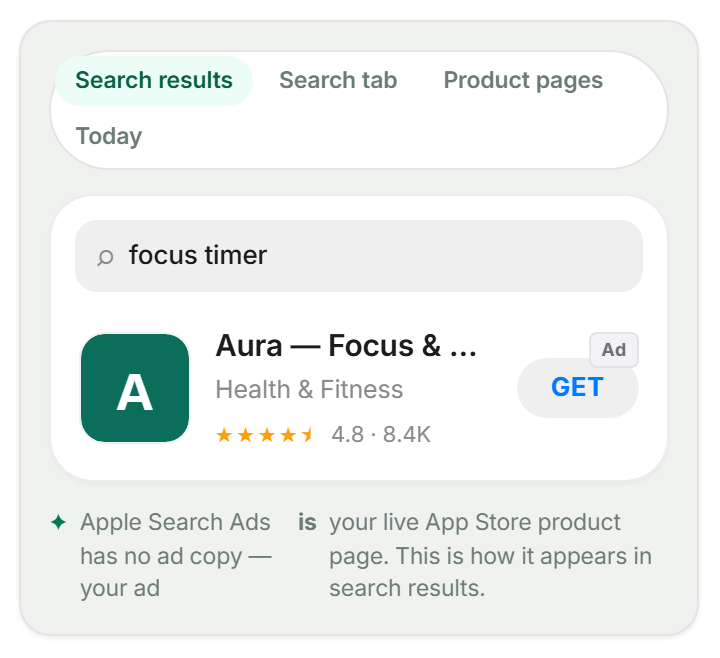
Create and manage campaigns, then harvest the search terms.
Promote a keyword
Build a Search-results campaign around the keywords you already track for the app.
Every placement
Search results, Search tab, Product pages and the Today tab, each previewed live.
Precise targeting
Audience, device, gender, age and ad scheduling, plus per-keyword bids and negatives.
Search-term harvesting
See the real searches that triggered your ad; promote the winners, exclude the wasted spend.
Performance at a glance
Impressions, taps, spend and installs. Per campaign and per keyword, in your org's currency.
Your account, connected through the Apple Search Ads API
Connect your own Apple Search Ads account with an API key; campaigns live there, fully yours.
Straight talk about what this is
- We help you create and manage Apple Search Ads campaigns. We don't guarantee installs. Results depend on your app, listing, and bids.
- There is no ad copy on Apple Search Ads. Your ad is your live App Store product page, so the way to improve the creative is to improve your listing (which is the rest of ASOScan).
- Apple Search Ads runs on a pasted API key (.p8), not a browser sign-in. The ad network and your organic rank are separate: ads drive taps, not organic rank.
- The Today tab placement usually needs a custom product page set up in Apple Ads; we flag it, we don't create it for you.
- This is the iOS twin of our Google Ads campaigns; Android apps run there.
Questions about Apple Search Ads.
Is there any ad copy to write?
No. On Apple Search Ads, your ad IS your App Store product page. There are no headlines, descriptions, or images. ASOScan shows a live preview of exactly how your listing serves in each placement; to improve the creative, improve your listing.
Which placements can I target?
All four: Search results (keyword-targeted), the Search tab, Product pages (the “You Might Also Like” slot on other apps), and the Today tab. Each has a live App Store preview in the builder.
Will this spend my money automatically?
No. Every campaign is created PAUSED. Nothing spends until you explicitly enable it, and you can pause it again at any time.
How do I connect my Apple Search Ads account?
Apple Search Ads uses an API key (a .p8 file), not a browser sign-in. You paste it once in ASOScan; we then create and manage campaigns in your own Apple Search Ads org.
What targeting can I set?
Audience (all / new / returning users), device (iPhone / iPad), gender, age band, and ad scheduling (dayparting). You can also set per-keyword bids and add negative keywords.
Do you run Google Ads too?
Yes. Android apps run Google App and Search campaigns on the Ad Campaigns page. Apple Search Ads is the iOS counterpart.
Paid, wired to your organic work.
The keywords you track become your Apple Search Ads targeting.
Your ad is your listing: improve the listing, improve the ad.
Run paid acquisition on the Play Store the same way.
Background reading: ASO vs Apple Search Ads, and when to use each, running Google Ads and Apple Search Ads from your ASO keywords, the ad campaigns feature, or the ASO glossary.
Launch your first App Store ad paused.
Connect Apple Search Ads, pick your keywords and placement, and preview the ad before you spend a cent.
Start free trial7-day free trial, no credit card.