

Resize and check your App Store & Google Play screenshots
Most resizers just resize. This one first tells you what the stores will reject: the wrong pixel size, a hidden alpha channel, or Play's two-to-one rule that every iPhone screenshot breaks. Then it crops, resizes or pads to fix it. Runs entirely in your browser. Nothing is uploaded, and there's no signup.
Drop your screenshots here
PNG or JPEG, up to 30 files. Nothing is uploaded.
What this tool checks
- The exact pixel size Apple accepts for every iPhone and iPad family, back to the 3.5″ iPhone. Apple rejects anything even one pixel off.
- A PNG alpha channel, which macOS screenshots and most design-tool exports add by default and both stores refuse.
- Google Play’s rule that the longest side can be at most twice the shortest. Every iPhone since the X breaks it.
- Play’s 320-3840 px bounds on phone, and 1080-7680 px on tablet.
- Whether you have enough screenshots: 1-10 per device type on Apple, at least 2 to publish on Play.
- Whether at least 4 are 1080 px or larger, which Play requires for its large-format recommendations.
- Which device a screenshot already fits, so a valid older size is never mistaken for one that is too small.
What size do App Store and Google Play screenshots need to be?
Apple accepts only exact pixel sizes, and two of them cover every device: 1320 × 2868 for the 6.9″ iPhone and 2064 × 2752 for the 13″ iPad, which Apple scales down for everything smaller. Google Play works the opposite way: any size from 320 to 3840 px per side, as long as the longest side is no more than twice the shortest.
| Store | Target | Portrait size | When you need it |
|---|---|---|---|
| App Store | 6.9″ iPhone | 1320 × 2868 · 1290 × 2796 · 1260 × 2736 px | Required if your app runs on iPhone, unless you supply 6.5″ instead |
| App Store | 6.5″ iPhone | 1284 × 2778 · 1242 × 2688 px | Required only if you don’t supply 6.9″ |
| App Store | 13″ iPad | 2064 × 2752 · 2048 × 2732 px | Required if your app runs on iPad |
| Google Play | Play phone | 320–3840 px / side | At least 2 screenshots across all device types to publish |
| Google Play | Play 7″ / 10″ tablet | 1080–7680 px / side | Each side 1080–7680 px; 4 or more recommended for tablet surfaces |
The two rules that actually get screenshots rejected
- A PNG alpha channel. Both stores reject the channel itself, not just visible transparency, so a fully opaque 32-bit PNG still fails. macOS screen capture, the iOS Simulator and most design-tool exports write one by default, which is why this catches so many sets.
- Google Play's two-to-one rule. Every iPhone since the X is roughly 2.17:1, taller than the 2:1 Play allows. An iPhone set uploaded to Play unchanged is rejected, and it is the single most common reason a cross-platform release stalls.
Every size above was checked against Apple's and Google's own spec pages on 2026-08-17. For every accepted size including the older devices, see the full screenshot size reference.
Your screenshots are the right size. Are they better than your competitors'?
ASOScan puts your listing next to every competitor's, screenshot for screenshot and field for field, on one page, so you can see what they show first and you don't.
Run a free ASO scan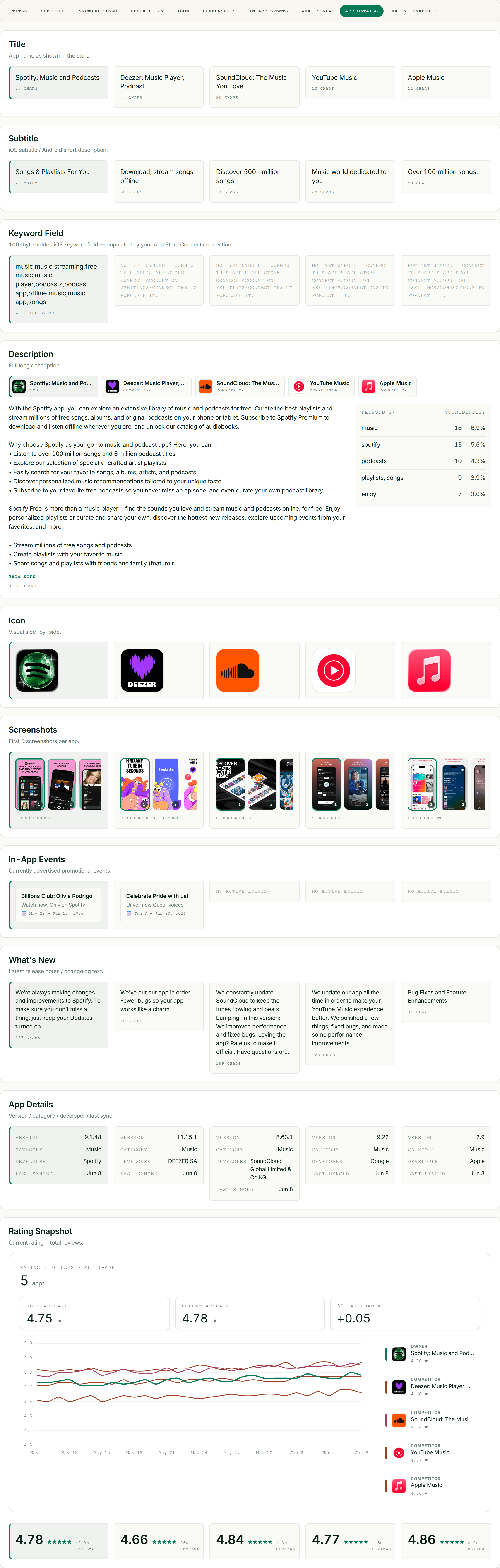
Screenshot resizing FAQ
What size should App Store screenshots be?
Apple needs the 6.9-inch iPhone size at 1320 × 2868 px portrait, or the 6.5-inch at 1284 × 2778 px if you don’t supply 6.9-inch, plus the 13-inch iPad at 2064 × 2752 px if your app runs on iPad. Apple scales those down to smaller devices for you. The sizes must be exact (one pixel off is rejected), which is what this tool checks before you upload.
Can I use the same screenshots on the App Store and Google Play?
Not directly. Google Play requires the longest side to be no more than twice the shortest, and every current iPhone screenshot is about 2.17 times as tall as it is wide, so an iPhone set uploaded to Play as-is is rejected. Drop your files in here, switch the store to Google Play, and the tool will crop or pad them to a size Play accepts.
Why does the App Store say my screenshot has an alpha channel?
Because the PNG declares a transparency channel, even when nothing in the image looks transparent. macOS screenshots, the iOS Simulator and most design-tool exports write 32-bit PNGs by default, and the stores reject the channel itself rather than checking for see-through pixels. This tool flags it on drop and exports JPEG, which cannot carry a channel at all.
Are my screenshots uploaded anywhere?
No. Every file is read, resized and saved inside your browser using the standard canvas API. Nothing is sent to a server, there is no account, and closing the tab discards everything.
Why does it export JPEG instead of PNG?
Because a browser canvas can only write 32-bit PNGs, which carry the alpha channel both stores reject, so a PNG option would quietly hand you a file that fails review. JPEG cannot carry a channel, and at high quality it is visually indistinguishable on flat app UI. Both stores accept JPEG.
Do screenshots affect my app’s ranking?
No. Screenshots are not indexed for search, so they don’t affect keyword ranking. They are a conversion lever: they strongly influence whether someone installs after seeing your listing, and the resulting installs and ratings can help ranking indirectly over time.
Sources
Every size and rule this tool enforces was checked against those two pages on 2026-08-17.