Know what to fix in your listing, and why.

An ASO audit of your App Store or Google Play listing: the fixes, most urgent first, each with the numbers that prove it.

7-day free trial, no credit card.

High

'study music' ranks on Google Play but not on the App Store

study musicVolume 89/100Difficulty 41/100Not in top 100

You rank #13 for 'study music' on Google Play but not in the top 100 on the App Store. It needs only 'study' in your keyword field: 'music' is in your title.

How to fix

Add 'study' to the keyword field; it pairs with 'music' already in your title to form the full term. Ship it in the next update and check your App Store rank for this term in two weeks.
Detected + AIKeywordsChecked Nov 23, 2026
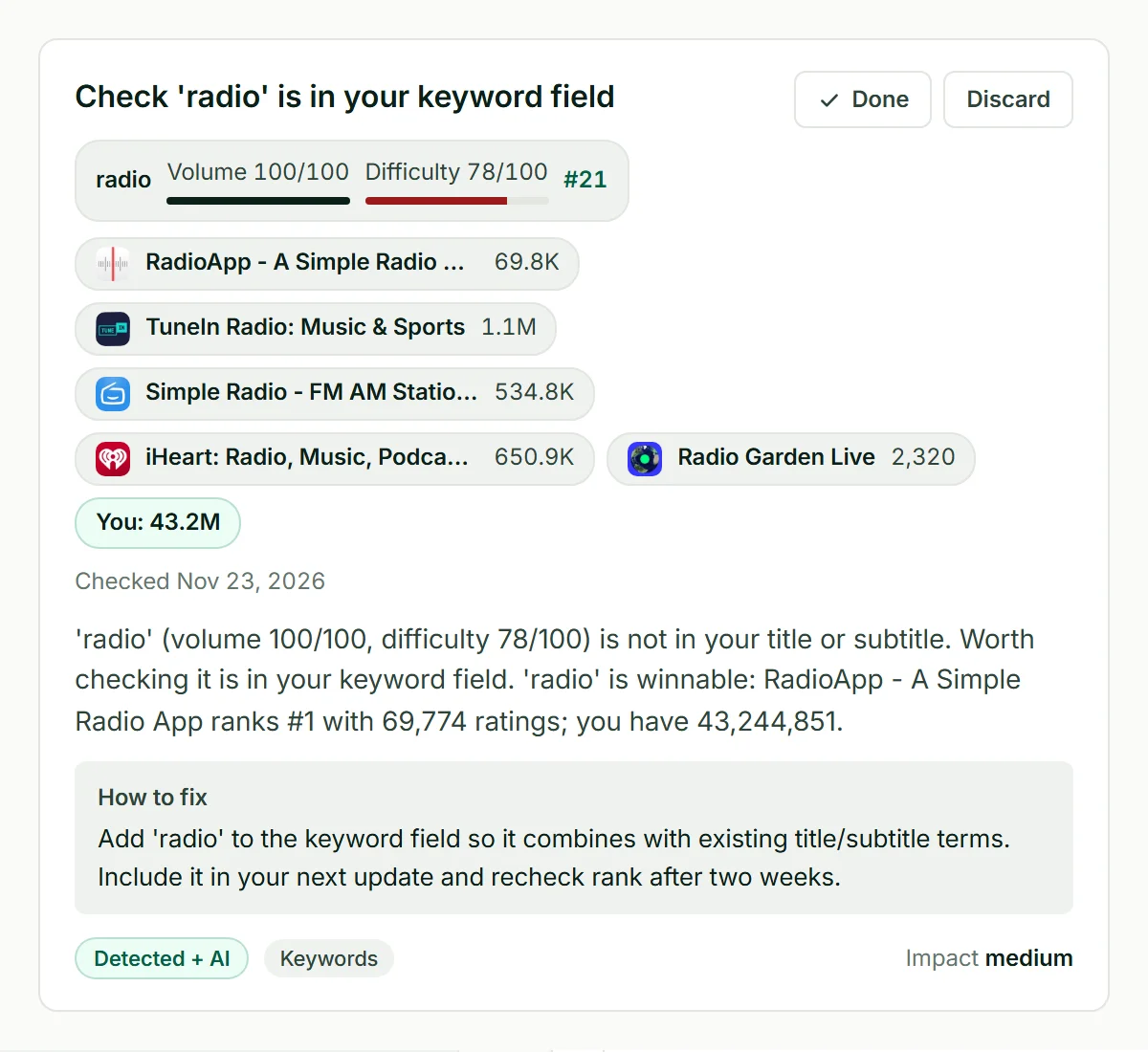
A real card, from ASOScan's own Spotify listing on the App Store.

Every fix shows its proof.

ASO Recommendations is the list of fixes that ASOScan writes for your app. Generic advice says “use your keywords”. A card names the keyword, shows why it matters for your app, and says where to put it.

  • Volume and difficulty out of 100 for the term.
  • Your rank, and how it moved.
  • The top apps for the term and how many ratings they have.
  • The field to change, and what to put there.
A real ASO recommendation in ASOScan: check 'radio' is in Spotify's keyword field, with the top apps for 'radio' and their rating countsA real ASO recommendation in ASOScan: check 'radio' is in Spotify's keyword field, with the top apps for 'radio' and their rating counts

Four kinds of fixes in one ASO audit.

Each card has a name, so you know at a glance what kind of fix it is.

Listing checks

Gaps in each field the store reads.

  • Title cut off
  • Missing subtitle
  • Keyword field underused
  • Few screenshots
  • Stale listing

Keyword evidence

Terms worth your characters, with their numbers.

  • Missing core term
  • Winnable keyword
  • Go long tail
  • Subtitle repeats title
  • Try this term instead

Rank and change history

What moved, and when.

  • Rank moves
  • Rank loss
  • Listing change review

Storefront and language

What shoppers see in each country.

  • Storefront not updated
  • Language mismatch

You changed your listing. Here is what moved after.

When your title, subtitle or description changes, a card follows the ranks of the terms the change touched. It tells you what rose and what fell after the change. Other apps and the store change too, so the card never claims your edit was the cause.

  1. Day 0You change your subtitle.
  2. Days 1 to 7Early checks. The card says it is early.
  3. Days 8 to 21The card updates after every daily rank check.
  4. After day 21It keeps its last reading as the record of the change.

Ready to paste, with the character count.

When a card asks you to change your title, subtitle, short description or keyword field, it can include the line to use and how many characters it takes. You paste it into App Store Connect or the Play Console. ASOScan never publishes it for you.

Keyword fieldExample
study,focus,sleep,lofi,offline,radio,playlist
45/100 characters

Most urgent first

Critical fixes sit at the top of the list. Start there and work down.

Keeps itself current

Cards appear when you add your app and refresh every week at no cost. A fix your data no longer supports closes by itself.

Then prove it moved

Your ASO score keeps a daily history, so you can see the result of each fix you ship.

Questions about ASO recommendations.

What is an ASO audit, and how is this one different from a checklist?

An ASO audit lists what holds your App Store or Google Play listing back and how to fix it. A checklist is the same for every app. ASOScan builds the list from your own listing, your keyword ranks and your competitors, so each fix names your terms and shows your numbers.

Do these recommendations guarantee better rankings?

No tool can promise a rank. Each card says what the evidence shows, what to try, and when to check the rank again. Good ASO improves how people find your app, and the cards help you work on the changes with the most evidence behind them.

Where do the numbers come from?

From the data ASOScan already tracks for your app: daily rank checks, volume and difficulty out of 100 for each keyword, the top apps for each term and their ratings, your competitors, and the history of your listing changes.

Does ASOScan change my listing?

No. A card can include a ready-to-paste line with its character count. You copy it into App Store Connect or the Play Console yourself.

How often do the recommendations update?

They appear when you add your app, update once your keywords and competitors are in place, and refresh every week at no cost. A fix that your data no longer supports closes by itself.

Does it work for the App Store and Google Play?

Yes. The checks follow the rules of each store: the subtitle and keyword field on the App Store, the short and full description on Google Play.

From the fix to the result.

Background reading: the ASO checklist, the ranking factors that matter this year, or how ASOScan works, step by step.

See what to fix in your listing.

Add your app by URL. Your first recommendations are ready in about a minute.

Start free trial

7-day free trial, no credit card.